
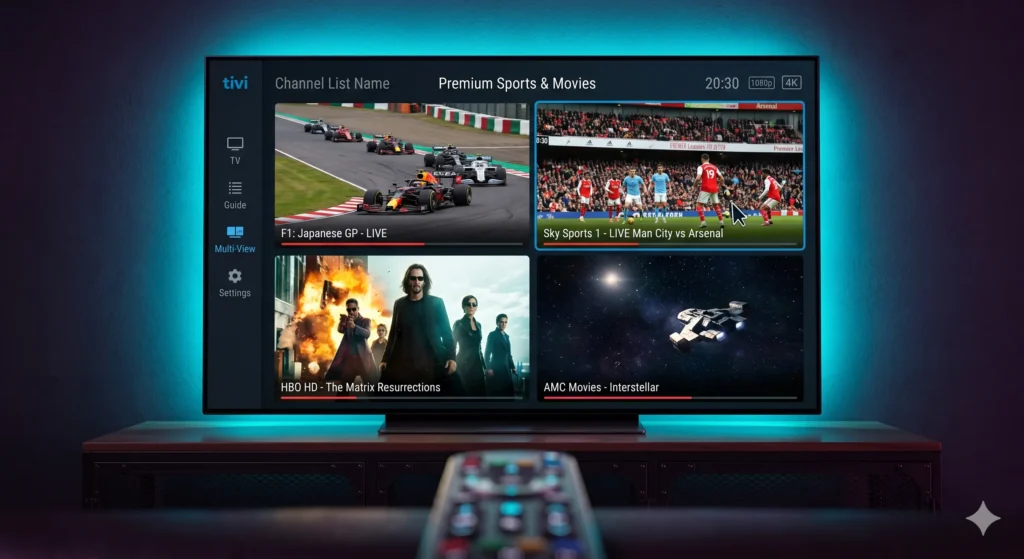
When it comes to high-end streaming, TiviMate Premium 2026 still sets the standard for serious IPTV users. As a developer who values clean code and smooth UI, I can tell you that this app is the only one that consistently turns a raw playlist into something that feels like a premium cable box. It combines a sleek large-screen interface with power-user features like multiple playlists, catch-up, and deep UI customization.
STOP BUFFERING
Don’t let a frozen screen ruin the match.
Switch to the World’s #1 Premium Server today.
Whether you are using Android TV, Fire TV, or Nvidia Shield, TiviMate remains the best IPTV player for Firestick 2026. It is easy enough for beginners but offers the depth that experts like us in Morocco demand for a lag-free experience.
Table of Contents
Why Upgrade to TiviMate Premium 2026?
While the free version is usable, the premium tier is where the magic happens. To turn your setup into a serious long-term platform, the upgrade is mandatory. TiviMate Premium 2026 unlocks:
- Multiple Playlists: Combine main and backup providers in one place.
- Recording & DVR: Schedule and save live channels for later.
- Catch-up: Revisit broadcasts archived by your provider.
- Multiview: Perfect for watching multiple sports matches simultaneously.
TiviMate vs IPTV Smarters: Which One Wins?
In the TiviMate vs IPTV Smarters debate, the choice depends on your device. Smarters is great for mobile and mixed-device households, but TiviMate is the undisputed king for large-screen TV use. It feels more refined, faster, and more purpose-built for the living room.
Mastering the Interface and Custom EPG TiviMate Settings
The interface is where TiviMate becomes elite. A raw IPTV guide is often messy, filled with duplicate countries and dead channels. To achieve a professional look, you need to use the app’s customization tools.
Optimizing Your Custom EPG TiviMate
A strong custom EPG TiviMate setup is the heart of the interface. If the guide is wrong, even the fastest player feels cheap. We recommend:
- Map Correct Sources: Ensure every playlist is linked to a clean, accurate EPG.
- Clean Grouping: Hide groups you don’t use (like unused international sections or VOD folders).
- Refresh Strategy: Set guide data to refresh at sensible intervals to avoid overloading.
TiviMate Multi-View Setup: The Ultimate Tool for Live Sports
For sports fans, the TiviMate multi-view setup is the best reason to go premium. Imagine watching the World Cup, a Real Madrid match, and a UFC fight all on one screen.
Step-by-Step Multiview Workflow:
- Open a Live Channel in full-screen mode.
- Long-press OK/Select to bring up the player menu.
- Choose Multiview and select “Add Screen.”
- Pick Another Channel from your playlist.
Note: For a smooth experience, ensure your provider allows multiple simultaneous connections. Using 4 to 9 screens requires a powerful device like the Nvidia Shield or a high-end Android box.
Advanced Tuning: Hardware Decoding and Buffer Strategy
To ensure your 4K streams stay smooth, you need to dive into the settings. For the best IPTV player for Firestick 2026 performance, we always start with Hardware Decoding. This reduces CPU load and ensures motion clarity during fast camera pans in football or racing.
Buffer Management:
- On Wi-Fi: If you experience micro-freezes, raise the buffer one step.
- On Ethernet: Keep the buffer small for faster “zapping” (channel switching).
- In Multi-view: Avoid extreme buffer sizes to save memory on lower-end sticks.
Securing Your Setup with TiviMate Backup and Restore
Once you have perfected your layout and global favorites, you don’t want to lose your work. This is why TiviMate backup and restore is essential.
Recommended Workflow:
- Go to Settings > General > Backup Data.
- Save the file to local storage or a USB drive.
- On a new device, use Restore Data to copy your exact setup in seconds.
This feature is a huge time-saver for anyone managing multiple Firesticks or upgrading to a new Shield Pro.
Final Verdict: Why TiviMate Premium 2026 Stays on Top
TiviMate Premium 2026 remains the benchmark for committed IPTV viewers. It isn’t just a player; it’s a control center for live TV, sports, and EPG management. If you want your streaming to feel like a premium entertainment product rather than a neglected add-on, TiviMate is the best investment you can make this year.